


Today’s range of cloud project management software solutions allows organizations of all sizes to leverage enterprise-grade project management features, including streamlined project workflows, enhanced collaboration tools, real-time project data access from anywhere, and generative artificial intelligence (AI) capabilities.
I evaluated the top products on the market to see how they compared pricing, features, integrations, and customer support. Here are my picks for the top cloud project management solutions for 2026:
- Asana: Best for support, collaboration, and reporting
- Jira: Best for software teams and customizable dashboards
- monday.com: Best for pre-made templates and customizability
- Smartsheet: Best for industry-specific applications
- TeamGantt: Best for visualizing workloads and team availability
- YouTrack: Best for extensive customization and collaborative tools
- Zoho Projects: Best for time-tracking and resource management
- Wrike: Best for AI-powered automation
- Basecamp: Best for simple, innovative features
- Trello: Best for visual Kanban collaboration
- Top cloud project management software comparison
- Asana: Best for support, collaboration, and reporting
- Jira: Best for software teams and customizable dashboards
- monday.com: Best for pre-made templates and customizability
- Smartsheet: Best for industry-specific applications
- TeamGantt: Best for visualizing workloads and team availability
- YouTrack: Best for extensive customization and collaborative tools
- Zoho Projects: Best for time-tracking and resource management
- Wrike: Best for AI-powered automation
- Basecamp: Best for simple, innovative features
- Trello: Best for visual Kanban collaboration
- Key features of cloud project management software
- Methodology
- Frequently asked questions (FAQs)
- Bottom line
Top cloud project management software comparison
At a glance, here’s how the top cloud project management software solutions stack up in terms of their key features, benefits, and pricing in 2026:
| Main Features | Support | Pricing | |
|---|---|---|---|
| Asana |
|
|
$13.49/user/month |
| Jira |
|
|
$7.91/user/month |
| monday.com |
|
|
$12/user/month |
| Smartsheet |
|
|
$12/member/month |
| TeamGantt |
|
|
$12/project/month |
| YouTrack |
|
|
$5.40/user/month |
| Zoho Projects |
|
|
$5/user/month |
| Wrike |
|
|
$10.00/user/month |
| Basecamp |
|
|
$15/user/month |
| Trello |
|
|
$5/user/month |

Asana: Best for support, collaboration, and reporting
Overall rating: 4/5
- Core Features: 4/5
- Additional Features: 4/5
- Integrations: 5/5
- Support: 4/5
- Vendor Profile: 3/5
- Product Design: 5/5
As a “born-in-the-cloud” offering, Asana was one of the first to break the mold of traditional desktop project management software applications like Microsoft Project. To this day, the leading cloud-based project management platform is a favorite among large and small teams alike.
Asana may be focused on delivering an intuitive, user-friendly mobile/cloud-first interface, but under its hood is a powerful and comprehensive feature set for effectively managing tasks, projects, and collaborations that rival most desktop-only project management solutions. Recently, Asana has developed tighter third-party integrations with leading CRMs like Salesforce and Hubspot, and even competing project management tools like Jira.
Visit Asana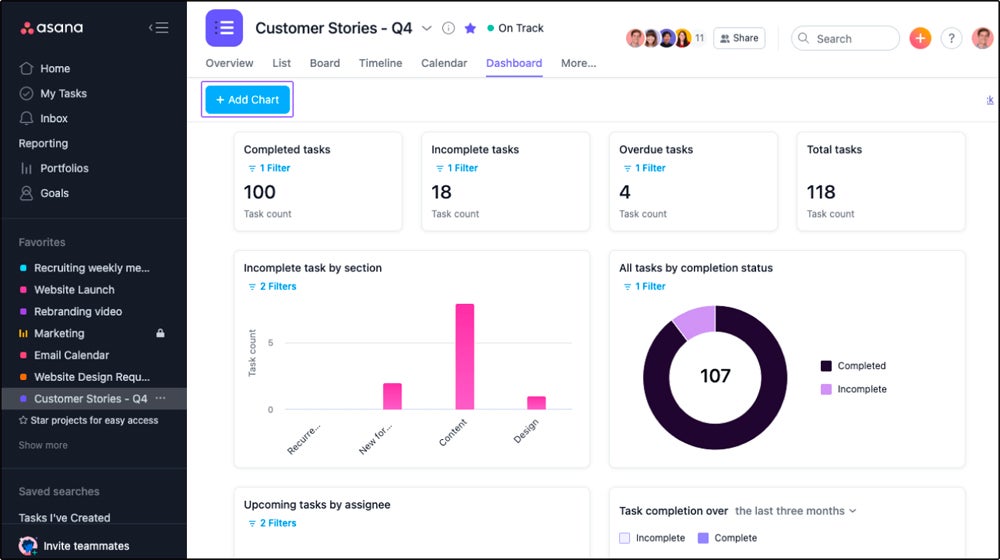
Pros and cons
| Pros | Cons |
|---|---|
| Allows for streamlined integrations with existing workflows and processes | Not an intuitive tool for non-project management professionals |
| Variety of third-party integrations | Limitations in task assignment capabilities/options |
| Comprehensive toolset—from project planning, task delegation, and project status monitoring to real-time communication/collaboration features | Numerous extraneous features and options make for a cluttered user experience |
Pricing
- $24.99 per user, per month
- Free tier available
Features
- Lets users view tasks individually and within overarching project schedules
- Comes with a wide range of pre-built project templates
- Integrates with other office and business productivity tools/platforms like Google Workspace, Slack, and Salesforce
Product design
Asana’s reporting dashboard allows users to track project performance and offers a big-picture view of organizational KPIs. Customizable widgets let users add different kinds of charts to visualize existing project data, and the KPI business dashboard displays key performance metrics in table and graph formats.
Why I picked it
Asana’s product development is based on its user-centric design and data-driven insights. The dashboard’s design focuses on user experience, making it easier to navigate for any kind of projects and portfolio management. Asana stands out because of its combined efficiency, collaboration, and innovation, making the project management process faster and easier.

Jira: Best for software teams and customizable dashboards
Overall rating: 4/5
- Core Features: 4/5
- Additional Features: 4/5
- Integrations: 5/5
- Support: 4/5
- Vendor Profile: 5/5
- Product Design: 5/5
Like Trello and YouTrack, Jira is primarily geared toward software project management. However, the leading project management platform has also gained a following outside of software circles. The solution features a customizable workflow, a multi-faceted issue-tracking system, and other features that help to streamline the management of complex projects.
Visit Jira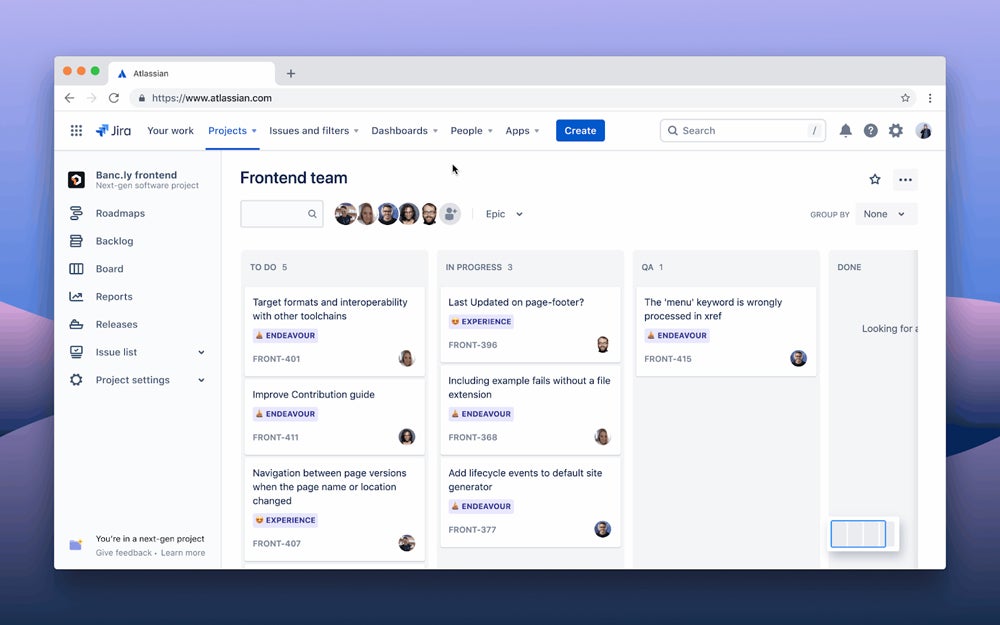
Pros and cons
| Pros | Cons |
|---|---|
| Ideal for managing application development projects | Some organizations may find the solution too specific for software teams |
| Strong task and activity tracking features | The user interface can be confusing for some users |
Pricing
- Standard: Starts at $7.91 per user, per month
- Premium: Starts at $14.54 per user, per month
- Enterprise: Custom annual pricing
- Free tier available
Features
- Integrates seamlessly with popular code versioning tools like GitHub, GitLab, and Bitbucket
- Support for Agile software development and modern software engineering practices like Scrum and Kanban is fully available
- Backlog grooming/management, sprint planning, and release tracking are available on top of standard task and project tracking features
Product design
Jira’s dashboard is extensively customizable, as it comes with various tools that track many elements of agile methods within the dashboard. It has widgets for sprint health, burndown charts, and high-priority issues and provides a complete overview of project status and progress.
Why I picked it
Jira’s deep connections with Confluence and Loom enable greater knowledge sharing and cross-functional connectivity, resulting in enhanced collaboration and efficiency. Companies such as Roblox have experienced considerable cost savings after merging numerous technologies into Jira, while new accessibility features use Atlassian Intelligence to automate activities and increase information clarity.

monday.com: Best for pre-made templates and customizability
Overall rating: 4/5
- Core Features: 5/5
- Additional Features: 3/5
- Integrations: 3/5
- Support: 4/5
- Vendor Profile: 2/5
- Product Design: 5/5
monday is another born-in-the-cloud project management solution geared for enterprise and corporate users, with both Software-as-a-Service (SaaS) modes and a local/on-premises Windows/macOS version. The solution offers a visually appealing UI, intelligently designed dashboards, unified workflows, and collaborative spaces for planning, executing, and tracking projects.
Visit monday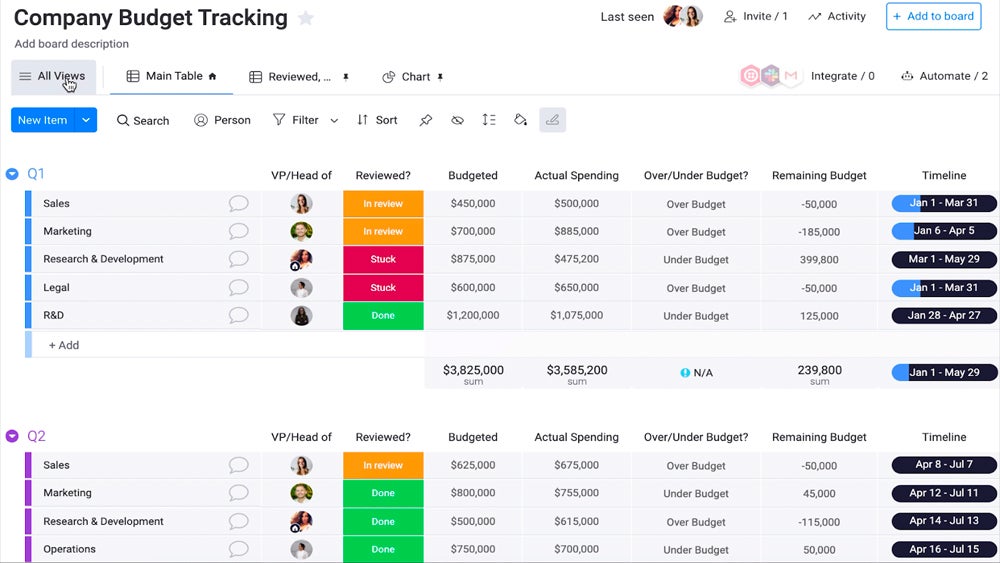
Pros and cons
| Pros | Cons |
|---|---|
| Lots of customizable interfaces, automation, and workflows | Time and expense tracking is difficult |
| Ready-made templates and assets | Users have reported issues with integrations (and a suboptimal API experience) |
Pricing
- Basic: $12 per seat, per month
- Standard: $14 per seat, per month
- Pro: $24 per seat, per month
- Enterprise: Custom pricing
- Free tier available
Features
- UI allows for customizations and unique workflows/project timelines/progress indicators
- Automation capabilities streamline common and repetitive tasks
- Ample pre-built, ready-to-use project management assets
- Over 200 ready-made templates, no-code automation snippets, integration connectors
Product design
monday.com’s dashboard allows users to visualize project data and communicate with dashboard team members on specific task items, media, and documents. Each dashboard widget and viewing setting are customizable, letting users save their preferred default view settings. It also comes with insights and workload management to monitor team workload and identify task progress. These are presented using tailored charts to make it easier for a project manager to identify areas that need priority.
Why I picked it
monday.com is a highly customizable dashboard that adapts team members’ specific workflows by providing Kanban boards, Gantt charts, and calendar views. Its detailed reporting allows project managers to monitor progress, identify bottlenecks, and make better-informed decisions as projects progress. The company has been continuously innovating and expanding the application marketplace to cater to specific requirements for each organization.

Smartsheet: Best for industry-specific applications
Overall rating: 4/5
- Core Features: 5/5
- Additional Features: 4/5
- Integrations: 5/5
- Support: 4/5
- Vendor Profile: 3/5
- Product Design: 5/5
Smartsheet is flexible, highly configurable project management software as a service (SaaS) for business users who need access via multiple devices. The solution provides task management and content collaboration tools, as well as spreadsheets and dashboards for bolstering office productivity.
Visit Smartsheet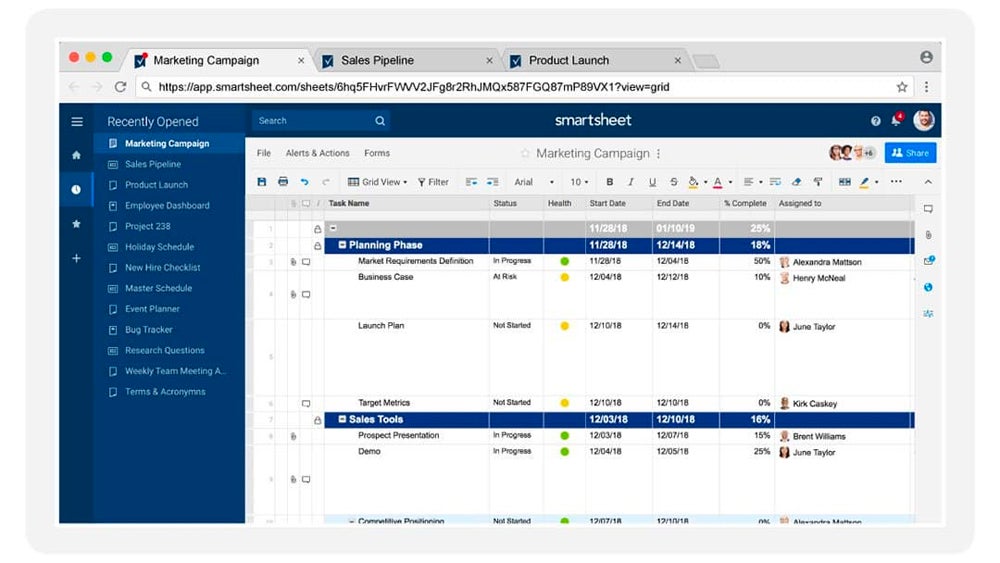
Pros and cons
| Pros | Cons |
|---|---|
| Lots of integrations | Novice project managers may encounter a steep learning curve |
| Highly customizable for special use cases | Users have reported issues with real-time data updates |
Pricing
- Pro: $12 per member, per month
- Business: $24 per member, per month
- Enterprise: Custom pricing
- Free plan available
Features
- Includes specialized applications for different industries (e.g., retail barcode scanning feature to quickly track items and automatically input them into a spreadsheet)
- Integrates with popular applications for streamlining project management workflows
Product design
Smartsheet dashboard’s customizable widgets let you add reports, tasks, and project and campaign overviews. You can also add media and web content to the dashboard to give a better view of existing projects. Using a heatmap to identify task status, project managers have a clear overview of the overall status of the entire project.
Why I picked it
Smartsheet effortlessly incorporates extensive project management capabilities and sophisticated communication tools, allowing teams to improve processes, remove unnecessary chores, and increase overall productivity. This platform is intended to create a more efficient and unified work environment, making it an essential tool for teams seeking peak performance and successful outcomes. Whether managing major projects or organizing basic chores, Smartsheet gives you the flexibility and control you need to handle the challenges of the modern workplace successfully.

TeamGantt: Best for visualizing workloads and team availability
Overall rating: 4/5
- Core Features: 5/5
- Additional Features: 3/5
- Integrations: 3/5
- Support: 4/5
- Vendor Profile: 3/5
- Product Design: 5/5
TeamGantt is an easy-to-use project management tool that, like Wrike, centers around the Gantt chart model. The solution has a low learning curve and is ideal for small to medium-sized teams. Organizations can utilize this project management software to continuously monitor existing projects, manage portfolios, and identify specific tasks through a work breakdown structure.
Visit TeamGantt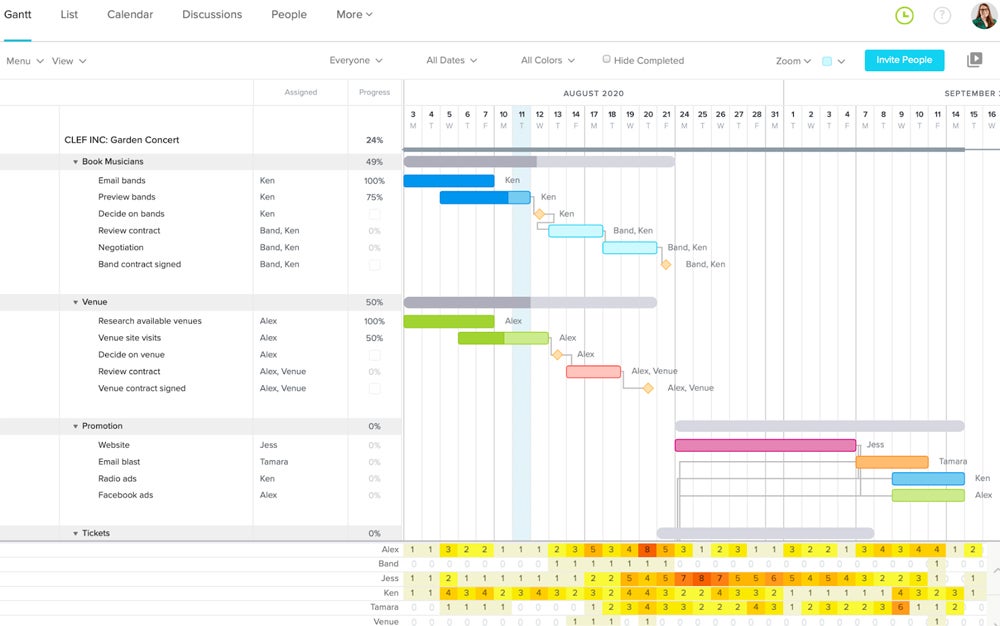
Pros and cons
| Pros | Cons |
|---|---|
| Intuitive and easy to use | Features for discussions, notifications, and uploaded files could be improved |
| Interactive Gantt charting functionality | No budgeting or invoicing tools |
| Simple drag-and-drop interactions | Reporting capabilities are limited |
Pricing
- Basic: $12 per project, per month
- Business: $24 per project, per month
- Builder Edition: $99 per month introductory pricing
- Enterprise: Custom pricing
- Free personal plan available
Features
- Allows simple Gantt charting with a minimal learning curve
- Extensive tutorials make getting up to speed easy
- Provides visibility for workloads and team availability
Product design
TeamGantt offers a chart-centric design that lets users plan tasks, manage workloads, and visualize work in a variety of formats. This also includes Gantt, lists, and a calendar view of assigned tasks and project status. In addition, the TeamGantt dashboard has resource management tools that help balance workloads among team members.
Why I picked it
TeamGantt provides user-friendly interface, continuous refinement, and adaptable pricing. It simplifies collaboration and task management, accommodates diverse methodologies, and offers affordable pricing for small businesses. The interactive Gantt chart feature provides a dynamic, visual approach to project timeline management.
YouTrack: Best for extensive customization and collaborative tools
Overall rating: 4/5
- Core Features: 4/5
- Additional Features: 4/5
- Integrations: 4/5
- Support: 3/5
- Vendor Profile: 5/5
- Product Design: 5/5
Czech software vendor JetBrains is perhaps best known for its software development integrated development environment (IDE), IntelliJ, and the Java-compatible Kotlin programming language. The company also develops YouTrack, a universal project management system used by over 85,000 teams across the world.
Visit YouTrack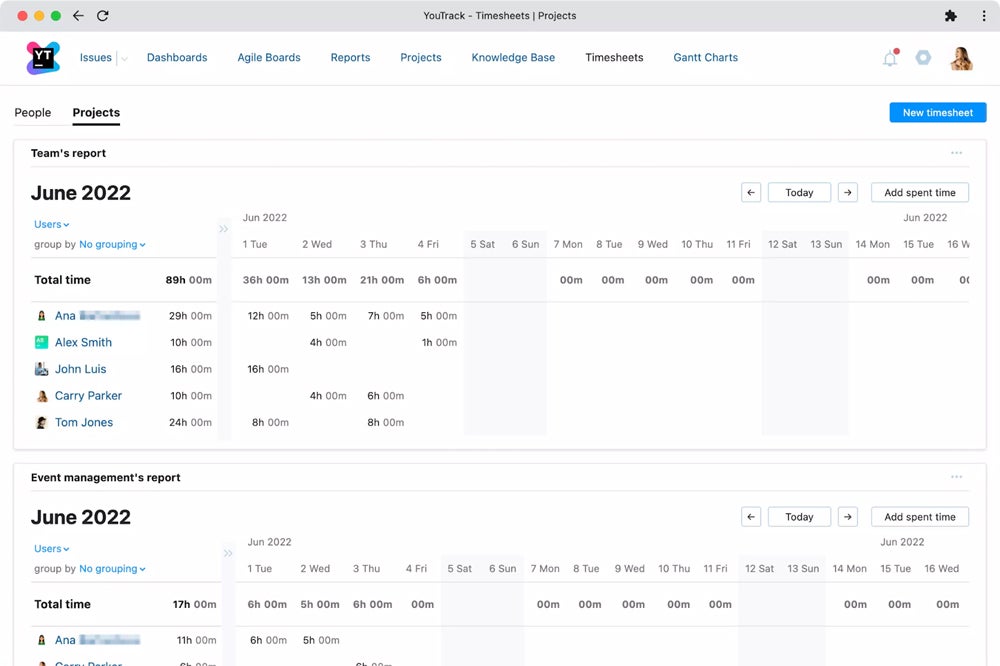
Pros and cons
| Pros | Cons |
|---|---|
| All-in-one workspace, strong dashboard widgets, and agile boards | Users have reported various UI/software bugs and glitches |
| The tool offers many customizations and collaboration tools | Can be difficult to configure |
| Ample integrations and automation | UI is dated |
Pricing
- Cloud monthly: Starts at $5.40 per user, per month
- Cloud annual: Starts at $4.50 per user, per month
- Helpdesk agents: $6 per agent, per month
- Free tier available for up to 10 users
Features
- Easy-to-use task manager
- Strong permissions management and agile workflow tools
Product design
YouTrack dashboards are customizable, letting you display collections of reports and other helpful information on a single page. Team members can create endless dashboards for personal, team, and client requirements and share them with other YouTrack members or publish them publicly, for anyone with the access link to view.
Why I picked it
YouTrack is best for its agile project management, which offers highly customizable workflows and issues a tracking system that you can tailor according to different project management styles for every organization. It offers seamless integration with various popular integrated development environments that makes it easier for developers to use.

Zoho Projects: Best for time-tracking and resource management
Overall rating: 4/5
- Core Features: 5/5
- Additional Features: 2/5
- Integrations: 4/5
- Support: 4/5
- Vendor Profile: 5/5
- Product Design: 5/5
Zoho has long been regarded as an affordable, enterprise-focused alternative to many of Microsoft’s Office tools. These days, Zoho Projects offers a full-featured cloud project management platform ideal for small and medium sized organizations.
Visit Zoho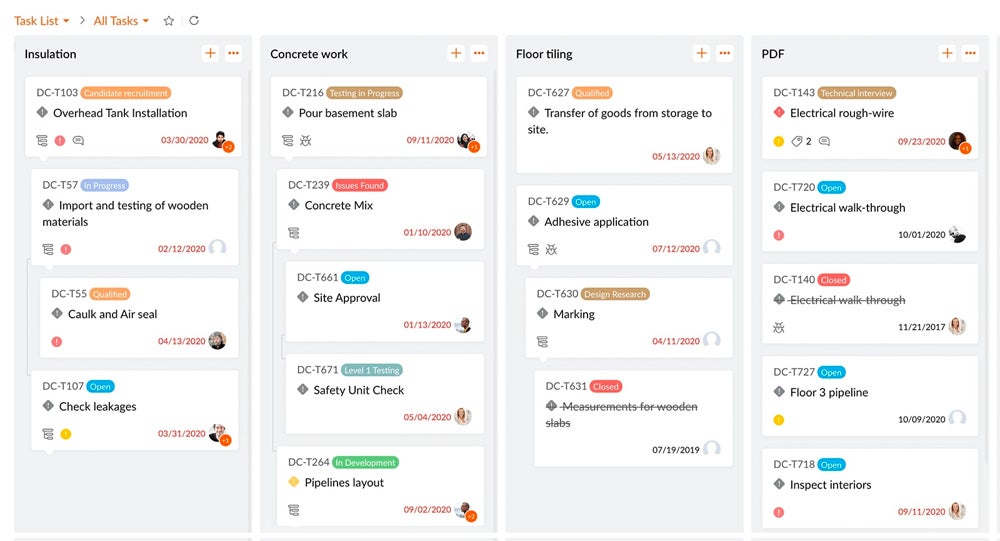
Pros and cons
| Pros | Cons |
|---|---|
| Easy to set up and learn with extensive configuration options | Does not include readymade templates out-of-the-gate |
| Strong time-tracking and in-app communication tools | Slightly unusual resource management view |
Pricing
- Premium: $5 per user, per month
- Enterprise: $10 per user, per month
- Free tier available
Features
- Offers built-in time-tracking and resource management reports
- Tracks and alerts on project budgets
- Project templates and workflows are customizable
Product design
Zoho Projects dashboard displays important progress indicators, graphs, statistics, and key performance metrics. It has repositionable widgets and customizable chart styles that provide an overview of work items and project progress.
Why I picked it
Zoho is not just a cloud project management platform; it also offers a customer relationship management (CRM) tool suitable for sales, marketing, and customer support. The platform’s powerful analytics provide important insights into customer behavior and campaign performance that enable more informed decision-making. Zoho’s seamless connectivity with various business software allows organizations to build a cohesive ecosystem that enhances efficiency and productivity while providing excellent customer service.

Wrike: Best for AI-powered automation
Overall rating: 3.7/5
- Core Features: 5/5
- Additional Features: 3/5
- Integrations: 3/5
- Support: 3/5
- Vendor Profile: 3/5
- Product Design: 5/5
As a project management tool, Wrike is most well-known for its strong Gantt chart creation features and options. The veteran project management player has managed to stack up an impressive list of industry awards and citations over the years for its user-friendly interface, real-time collaboration tools, automation capabilities, and features for helping manage complex projects more efficiently.
Recent Wrike updates include a refresh of its dashboards and user interface (UI), including a new look and feel for widgets and new automation and generative AI capabilities.
Visit Wrike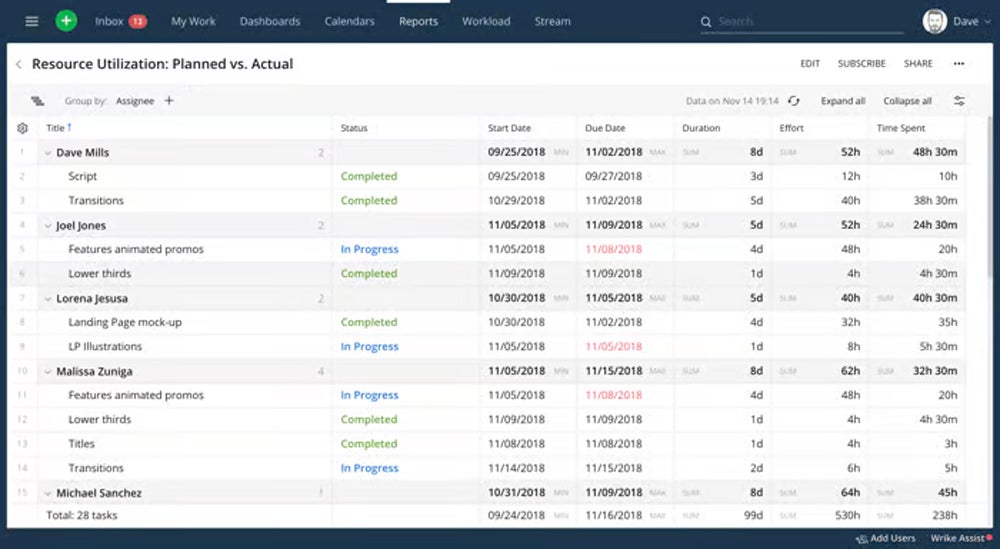
Pros and cons
| Pros | Cons |
|---|---|
| Comes with a variety of Gantt charts and forecasting features | Users have reported notification delays/latency with some integrations |
| Automation and AI features | No native team chat, with limited built-in note-taking tools |
| Comes with a myriad of integrations | Can be difficult to navigate/view tasks |
Pricing
- Team: $10 per user, per month
- Business: $25 per user, per month
- Enterprise: Custom pricing
- Pinnacle: Custom pricing
- Free tier available
Features
- Includes interactive project timelines for easily visualizing timelines and dependencies
- AI-powered features like project risk predictions/recommendations save time by automating tasks
- Integrates with popular tools like Salesforce and Adobe Creative Cloud
Product design
Wrike’s project management dashboard provides next-generation analytics that allow users to build custom views for individual, team, or executive use cases. The next-gen feature allows users to pivot tables for quick data summarization and activity stream widgets for collaboration insights. Personalized dashboards can be customized to reflect business objectives. It has clean and data-rich dashboards that offer a detailed overview of project data and the progress of the team.
Why I picked it
With over 400 third-party applications, Wrike’s interface enables end-to-end campaigns, creative projects, and event management, establishing new standards for team collaboration, efficiency, and success in the digital era. Its AI-driven features and customizable solutions allow streamlined workflows and improved collaboration among its customers and partners.

Basecamp: Best for simple, innovative features
Overall rating: 3/5
- Core Features: 5/5
- Additional Features: 2/5
- Integrations: 3/5
- Support: 3/5
- Vendor Profile: 4/5
- Product Design: 5/5
Chicago-based 37signals first released Basecamp in 2004 to bring project management to the web. Today, Basecamp 4 continues the platform’s long-running focus on simple, organized project collaboration, with tools for to-dos, scheduling, file sharing, message boards, client communication, and lightweight team chat. It also supports third-party integrations for time tracking, reporting, automation, and accounting, while keeping its interface clean and easy to navigate.
Visit Basecamp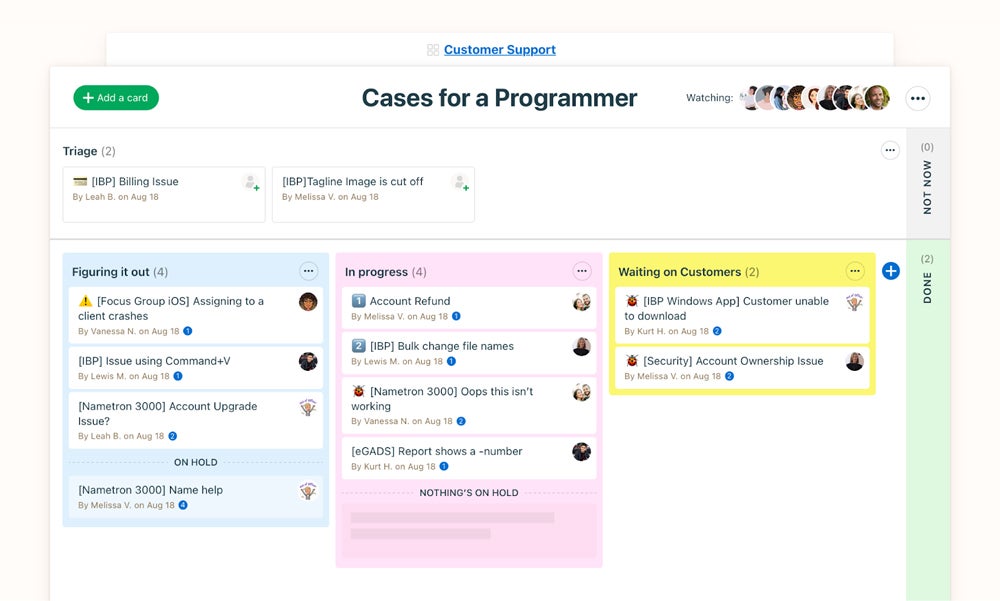
Pros and cons
| Pros | Cons |
|---|---|
| Strong communication features | Lack of advanced features and analytics |
| Intuitive and easy to learn | Could use more customization options |
Pricing
- Plus: $15 per user, per month
- Pro Unlimited: $349 per month
- Free tier available
Features
- Straightforward, minimalist UI is designed for simplicity
- A range of premium features include task, project, milestone, and timesheet management
Product design
Basecamp offers a straightforward one-page dashboard for projects, tasks, and schedules. Features include messages for conversations, to-do lists for managing tasks, and a “Campfire” for real-time group chat. Basecamp provides a unique approach to Kanban and Hill Charts to give teams a more intuitive and comprehensive way to track and communicate project progress.
Why I picked it
Basecamp’s unique approach to project management collaboration allows its users to message within the dashboard and offers a simple scheduling system, collaborative writing, and file sharing. It is suitable for small businesses looking for simple-to-use cloud project management software that needs an all-in-one platform for both communication and project management.

Trello: Best for visual Kanban collaboration
Overall rating: 3/5
- Core Features: 3/5
- Additional Features: 1/5
- Integrations: 4/5
- Support: 3/5
- Vendor Profile: 3/5
- Product Design: 5/5
For years, Trello’s no-nonsense, effective Kanban solution has been the project management tool of choice for teams looking to ramp up quickly with minimal user training. The tool’s visually minimalistic system of boards, lists, and cards for organizing tasks and projects makes it easy to get up to production speed.
Visit Trello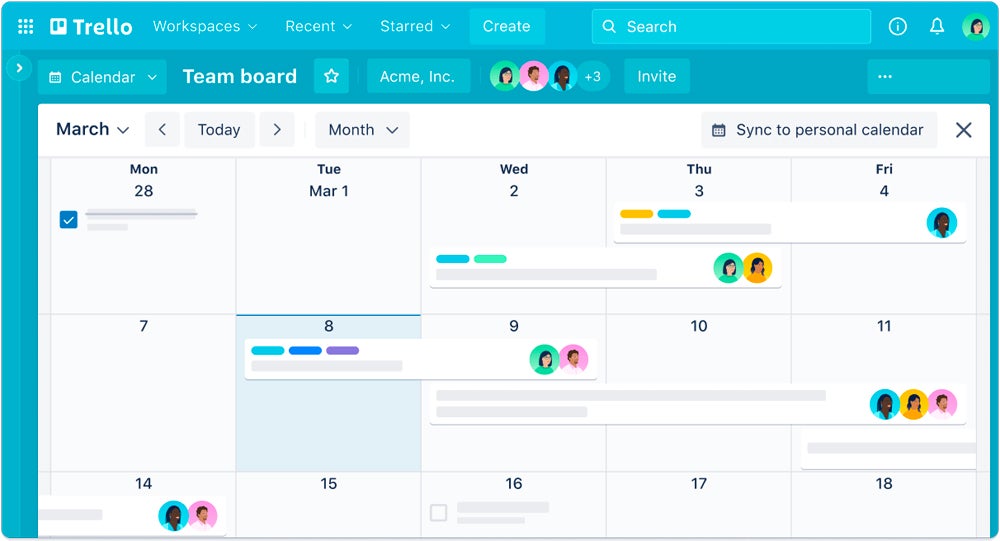
Pros and cons
| Pros | Cons |
|---|---|
| Power in simplicity with a low learning curve | Lacks many advanced features |
| Tool renders well across devices | Offers limited customization options |
| Strong notification features | Users have reported scalability issues for larger organizations |
Pricing
- Standard: $5 per user, per month
- Premium: $10 per user, per month
- Enterprise: Starts at $17.50 per user, per month
- Free tier available
Features
- Card covers can be customized to spruce up UI
- Advanced checklists allow for more granular task tracking
- Automation via Butler, Trello’s AI help bot
Product design
Trello’s dashboard is known for its dashboard view, which lets you visualize and communicate your teams’ work statuses with reporting tools. It provides customizable charts and lets you create reports on particular data such as due dates, card assignments, and cards per label.
Why I picked it
Trello is a strong tool for visual thinkers and organizers that provides a clear and manageable workflow and provides non-subscription users with free boards and cards to use. Its card-based ecology allows for a comprehensive perspective of projects and activities, encouraging innovation and strategic thinking. Trello’s interface is straightforward, providing a bird’s-eye view that elevates project management to better user experience.
Key features of cloud project management software
Project managers have myriad options for cloud project management at their disposal these days with competent offerings that address any number of unique requirements, use cases, and environments. In general, cloud project management software should allow for project creation, planning, management, and reporting, with tools that support the following activities and processes.
- Collaboration: Supports team communication, file sharing, comments, mentions, approvals, and other ways to keep project work visible across stakeholders.
- Task management: Covers how teams create, assign, prioritize, organize, and monitor work items from start to completion.
- Time tracking: Measures time spent on tasks, milestones, clients, or projects to support workload planning, billing, and performance tracking.
- Scheduling: Helps teams manage deadlines, project timelines, dependencies, resource availability, and expected delivery dates.
- Scalability and localization: Supports growing or distributed teams through features such as permissions, multi-language options, regional settings, global access, and admin controls.
To select the best product management software for your organization, determine which key features mean the most for your teams: flexibility, scalability, and accessibility, as well as specific features that facilitate project collaboration, planning, and execution. For example, software teams may benefit more from a solution like Jira, while creative/design teams may prefer a solution like Basecamp.
Methodology
To build this list of the best cloud project management software, I evaluated leading platforms based on the criteria businesses are most likely to weigh during the buying process. My goal was to identify tools that combine strong project management functionality with flexible pricing, useful integrations, solid support, and an interface that works well for day-to-day collaboration.
Each product was assessed using consistent criteria, including core features, pricing, support, integrations, product design, vendor reputation, and additional features. I looked at capabilities such as scheduling, task management, and project tracking, along with pricing flexibility, support resources, third-party connectivity, dashboard usability, vendor track record, and value-added functionality such as AI or collaboration features.
Products were scored based on how well they met these criteria, helping identify the cloud project management solutions that offer the strongest overall mix of usability, capability, and value.
Frequently asked questions (FAQs)
What are cloud project management tools?
Cloud project management tools are online platforms that facilitate planning, collaboration, and organization of tasks, resources, and timelines for projects, enabling teams to work efficiently and access project information from anywhere with internet connectivity.
How do they differ from traditional project management tools?
Cloud project management tools are web-based platforms accessed via the internet, providing real-time collaboration and data storage, whereas traditional project management tools are locally installed software, limiting accessibility and necessitating manual updates for collaboration.
Can these tools integrate with other software commonly used in project management?
A highly effective cloud project management tool should possess strong integration capabilities with third-party software, streamlining workflows by seamlessly connecting with tools like communication platforms, document management systems, and other essential applications.
How much should I expect to pay for cloud project management tools?
The cost of cloud project management tools varies widely, ranging from free or entry-level plans with basic features to premium subscriptions that can cost anywhere from a few dollars to several hundred dollars per user per month, depending on the platform and the level of functionality required.
Bottom line
Cloud project management software has come a long way already, and the market can expect to see accelerated innovation in the space over the coming months—especially in the domain of project analytics and data-driven optimization. And of course, AI/ML features and enhancements will continue to automate manual processes, enhance project managers’ decision-making capabilities, and improve overall project performance and delivery. All of the tools included in this product guide are feature-rich, powerful solutions; selection will come down to your organization’s specific needs.
Cloud project management solutions are just one tool in an organization’s data management toolbox. Learn more about why data management is so important to enterprise organizations, or find out what experts say are the best practices for implementing it.